Ever watched someone glide down the sidewalk effortlessly and wondered how they do it? You aren’t the only one captivated by the hoverboard trend.
While they haven’t quite reached the “flying car” status of science fiction, hoverboards have exploded from viral novelties into a billion-dollar industry. They are legitimate personal transporters now.
But what actually is a hoverboard? How do they stay upright without tipping over? And the big question: are they safe for your family?
This guide breaks down the mechanics, safety facts, and buying tips you need to know before you roll.
Key Takeaways
A hoverboard is a two-wheeled, self-balancing electric scooter. It uses internal gyroscopes and sensors to detect the rider’s center of gravity. To move forward, backward, or steer, the rider subtly shifts their weight and adjusts the tilt of their feet on the pressure-sensitive pads.
What Is a Hoverboard?
The term “hoverboard” first appeared in M.K. Joseph’s 1967 novel, The Hole in the Zero. However, most people associate the word with Back to the Future Part II. In that film, Marty McFly escapes bullies on a board that literally floats above the ground.
Modern hoverboards are popular gadgets for kids and adults, but there is a catch: they don’t hover.
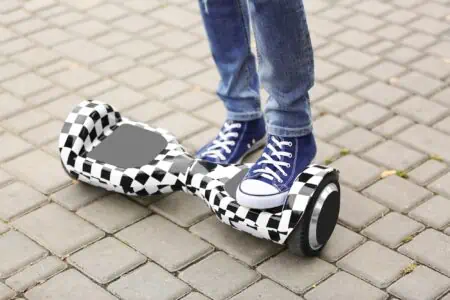
Technically, they are self-balancing two-wheeled electric scooters. They stay grounded. The “hover” sensation comes from the smooth, gliding motion created by the electric motors.
A standard board consists of two motorized wheels connected by a central hinge. The rider stands on a platform between the wheels. It runs on a lithium-ion battery pack and uses a logic board to interpret your movements.
In the US, regulations vary by state. Generally, you cannot ride hoverboards on public highways. Some cities restrict them from sidewalks or public parks. Most riders use them on private property, driveways, or specifically designated paths for recreation and short-distance travel.
How Do Hoverboards Work?
The magic behind the glide is actually just clever engineering. Let’s look under the hood.
A hoverboard has two pressure-sensitive footpads sitting on a pivoting frame. Inside, you will find:
- Gyroscope: Maintains balance and detects the tilt of the board.
- Microprocessors: The “brain” that processes data from the sensors.
- Motors: Located inside the wheels to provide power.
- Battery: Usually a lithium-ion pack that powers the system.
When you step onto the board, you trigger the sensors. The gyroscope sends data to the logic board, which tells the motors to keep the platforms level. This is why the board engages and straightens out the moment you step on.
The movement is intuitive:
- To move forward: Lean your toes down slightly. The sensors detect the forward tilt (usually around 5 degrees to start) and spin the wheels forward.
- To speed up: Lean further. The greater the tilt, the faster the motors spin.
- To turn: Push your left toe down to turn right, or your right toe down to turn left. This spins one wheel faster than the other.
- To spin: Push one toe down and the opposite heel down. The board will rotate in place.
The processor sends roughly 100 signals per second to the motors. This allows the board to make micro-adjustments instantly so you don’t faceplant.
Is a Hoverboard Safe?
Safety is the number one concern for parents. Like skateboards or bikes, falling is a real possibility.
Because the majority of riders are children, supervision is key. It is easy to misjudge a curb or lose balance at high speeds. Riders should always wear a certified helmet, knee and elbow pads, and wrist guards.
According to the CPSC, thousands of emergency room visits annually are attributed to hoverboard falls. Common injuries include wrist sprains, contusions, and fractures (1).
The Fire Risk Factor
You likely remember the news stories from 2015 regarding catching fire. Early models used cheap, unregulated lithium-ion batteries that were prone to overheating.
The industry has since changed. In 2016, UL (Underwriters Laboratories) introduced the UL 2272 certification. This is a rigorous safety standard for electrical systems in personal mobility devices.
Hoverboard safety has improved drastically, but risks remain. To stay safe:
- Only buy boards with the UL 2272 holographic seal.
- Use the charger provided by the manufacturer.
- Do not charge the board overnight or when you aren’t home.
Warning
The AAP advises that children under age five should not use skateboards or hoverboards due to their developing center of gravity (2). Children over six should only ride with adult supervision.
Pros and Cons of Hoverboards
Are these gadgets worth the hype? They offer great fun, but they aren’t perfect. Here is a breakdown to help you decide.
Pros
- Efficient Travel: They cruise between 6 and 10 mph, making them faster than walking.
- Pure Fun: The sensation of gliding is unique and entertaining for kids and adults.
- Portability: They are smaller than bikes or e-scooters, making them easy to stow in a trunk.
- Quick Learning Curve: Most kids figure out the balance mechanics within 10 to 15 minutes.
- Core Workout: Staying balanced engages your core and leg muscles.
- Cost-Effective: You can get a solid starter board for under $150.
- Eco-Friendly: They run on rechargeable batteries and produce zero emissions.
Cons
- Terrain Limits: Small wheels struggle on grass, gravel, or cracked pavement.
- Fire Safety: You must ensure you buy a UL-certified model to avoid battery risks.
- Gravity Risks: Falls happen. Balance and coordination are required.
- Legal Restrictions: Many malls, schools, and public parks ban them.
- Range Anxiety: Most budget boards only last about an hour (7-10 miles) per charge.
- Weight: While small, they are dense. Carrying a 25lb board when the battery dies is tiring.
Cost To Buy a Hoverboard
Hoverboards have become much more affordable. You can expect to pay between $100 and $300 for a reliable consumer model.
High-end off-road models with heavy-duty tires can go up to $500, while budget toys for small kids might drop to $80.
Here are a few popular models across different price points to give you an idea of the market:
- Gyroor Warrior Off-Road Hoverboard (Rugged, all-terrain).
- LIEAGLE Hoverboard With Bluetooth (Mid-range favorite).
- SIMATE Hoverboard With Bluetooth (Budget-friendly).
- Hover-1 Electric Hoverboard (Entry-level standard).
- Hover-1 H1-100 Hoverboard (Good for kids).
- Gotrax Hoverboard for Kids and Adults (Trusted brand).
How To Choose a Hoverboard
Not all boards are created equal. To get the best ride for your money, keep these factors in mind during your search.
Safety Certifications (Crucial)
This is non-negotiable. Look for the UL 2272 certification. This standard tests the electrical drive train, battery, and charger system for fire and electrical safety. If the product description doesn’t explicitly state UL 2272 compliance, do not buy it.
Wheel Size and Type
The wheels dictate where you can ride.
- 6.5-inch wheels: The standard size. Great for smooth driveways and indoor use. They struggle with cracks and bumps.
- 8.5 to 10-inch wheels: Usually found on “off-road” models. These are often air-filled (pneumatic) or rugged rubber. They provide a smoother ride and can handle dirt, grass, and uneven pavement.
Motor Power
Look at the wattage. A standard board usually has dual 200W or 250W motors. This is fine for flat surfaces and lighter riders. If you plan to tackle hills or are a heavier rider, look for dual 300W motors or higher. More power means better torque on inclines.
Speed and Range
- Speed: Most safe boards cap out at 6 to 9 mph. Anything over 10 mph is risky for a self-balancing device.
- Range: Check the mileage. An average battery offers 7 to 10 miles per charge. Higher-end models might hit 15 miles. Keep in mind that rider weight and hills will reduce this range significantly.
Weight Capacity
Every board has a minimum and maximum weight limit.
- Minimum: Usually around 44 lbs. If a child is too light, they won’t trigger the sensors properly, causing the board to shake violently.
- Maximum: Standard limits are around 220 lbs. Heavy-duty boards can support up to 265 lbs or more. Respect these limits to prevent motor burnout or frame snapping.
Extra Features
Modern boards come with fun bells and whistles:
- Bluetooth Speakers: Sync your phone and play music while you ride.
- LED Lighting: Essential for visibility if riding near dusk. Some boards have lights on the wheels and fenders.
- App Connectivity: Some brands (like Segway or Hover-1) have apps that let you adjust sensitivity, set speed limits for kids, and check battery life.
Build Quality
Cheap plastic cracks easily. Look for ABS plastic shells and aluminum alloy frames. Good rubber bumpers on the wheel arches are a plus, as they protect the board when it inevitably rolls over.
Top Tip
Charge your board after every ride to maintain battery health. However, do not leave it plugged in for days at a time. Overcharging can degrade lithium-ion cells.
FAQs

Are Hoverboards Legal?
Owning a hoverboard is legal, but riding one in public varies by location. In the US, many cities and universities ban them from sidewalks, roads, and public buildings. For example, New York City has strict laws against riding them in public spaces. Always check your local municipal codes before riding outside your private property.

What Age Are Hoverboards For?
Most manufacturers recommend riders be at least 8 years old. However, the AAP suggests waiting until a child is older to ensure they have the coordination required. Some “junior” boards are marketed for ages 6 and up, but adult supervision is always required.

How Fast Does a Hoverboard Go?
Standard hoverboards travel between 6 and 9 mph. High-performance models can reach up to 12 mph, but this increases the risk of serious injury during a fall. Speed limiters are often available via smartphone apps for younger riders.

How Many Miles Can a Hoverboard Go?
On average, a hoverboard travels 7 to 10 miles on a single charge. Premium models with larger batteries may reach 15 miles. Factors like rider weight, steep inclines, and speed will drain the battery faster.

How Long Does a Hoverboard Battery Last?
In terms of ride time, expect 45 minutes to 1 hour of continuous use. In terms of lifespan, a well-maintained lithium-ion battery typically lasts 1 to 2 years (or roughly 300 to 500 charge cycles) before it needs replacement.

Can You Ride a Hoverboard in the Rain?
Generally, no. Most hoverboards are not waterproof. They might have an IP54 rating, which means they can handle light splashes or dust, but riding in rain or through puddles can damage the internal electronics and void your warranty.
In Conclusion
Hoverboards have evolved from dangerous toys into refined personal transporters. Whether you are looking for a fun gift for a teen or a quirky way to get around the neighborhood, there is a board out there for you. Just remember: prioritize UL certification, gear up with a helmet, and keep your balance!